01
Save time on editing
02
Edit your photos with one click
03
Create a consistent style
Tools
Photoshop actions
Photoshop actions
Work faster, finish beautifully – with just one click in Photoshop
Make your workflow more efficient and effortlessly create a dreamy, professional finish. These Photoshop actions are designed for photographers who work with natural light and soft editing, and who want to save time without compromising on quality.
Photoshop actions
What can you expect?
✔
Flexible to adjust to your own style
✔
One click for commonly used edits and layer combinations
✔
Time-saving and consistent: no need to redo everything manually each time
✔
Suitable for both RAW and JPG files
✔
Works with Photoshop CC – including clear instructions on how to import
✔
Instant digital download

Watch
Photoshop actions for equine photographers
With my Photoshop actions, you get both control and convenience. Automate your favorite edits and give your photos that dreamy, romantic look in just a few clicks.
Photoshop actions
Black background
Save time on editing
Edit your photos with one click
Create a consistent style

Bring the blackphoto to life in your photos with just one click.
Contents
✔ camera raw adjustments
✔brighten the horse
✔100% black background
✔darken the surroundings
✔warm highlights
✔brown glow
✔sharpen the photo
✔remove yellow tone
✔remove blue tone
✔remove red tone
✔dodge burn dark
✔dodge burn light
✔contrast
✔vignette
✔darken the edges
15 adjustable actions for Adobe Photoshop CC:
Digital products
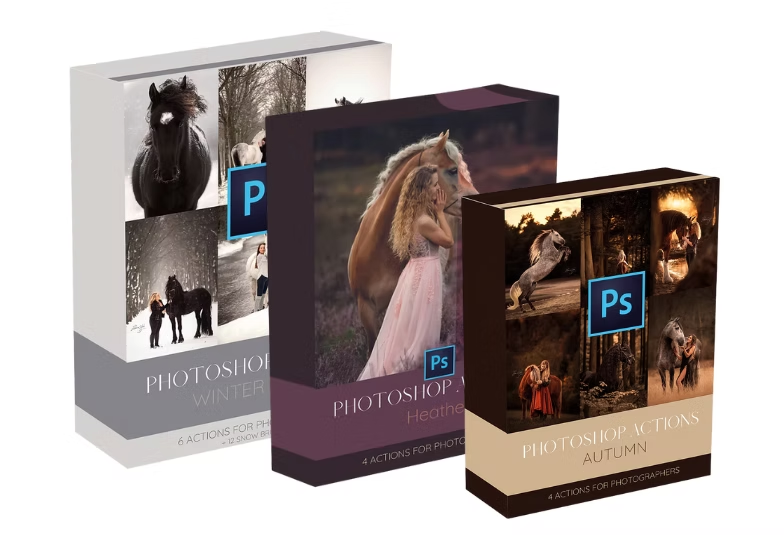
The four sets

Photoshop actions
Winter magic + snow brushes
Save time on editing
Edit your photos with one click
Create a consistent style

Bring the winter atmosphere to life in your photos with just one click.
Contents
✔WINTER GLOW
✔WINTER WARM
✔WINTER COLD
✔WARM SUN - dark photo with sunlight
✔WARM SUN - light photo with sunlight
✔RECREATE THE WINTER MAGIC - with a non winter photo
6 adjustable actions for Adobe Photoshop CC + 12 snow brushes
Photoshop actions
Complete equine photography workflow package
Save time on editing
Edit your photos with one click
Create a consistent style

Edit your horse photo completely with one click exactly the way I edit all my photos!
Contents
✔Camera raw color toning
✔Brighten horse
✔Brighten eye (dodge burn)
✔Darken eye (dodge burn)
✔Enhance horse texture
✔Contour shadows
✔Contouren glow horse
✔Balance warm tones
✔Vignette
✔Warm highlights
✔Brown glow
✔Accentuate brown tones
✔Yellow sky
✔Sharpen
✔Blur background
Do you want to edit your horse photos faster and more professionally, without the hassle? With this complete Photoshop Actions package, you’ll get my personal workflow in your hands exactly the way I edit my own images. From basic corrections to creative fine-tuning: with just one click, you can apply professional adjustments. Think of camera raw color tones, lighten model, warm highlights, brown glow, accentuate brown tones, and many more. Even the finest details come to life with actions like brighten eye (dodge & burn), contour shadows, and soften background. Everything in this package is specially developed for equine photography, so you can work faster while achieving consistent, atmospheric results.
Danielle v.G.
“I love how easy these actions are to use. With just a few clicks, my photos go from flat to breathtaking. The eye dodge & burn and coat texture actions are my absolute favorites.”
Sophie W.
“This actions pack has completely transformed the way I edit my horse photos! Everything is so much faster and the results look super professional. The warm tones and glow effects give my photos exactly the atmosphere I was always looking for.”
Monica W.
“What do I think of them? Amazing this investment is definitely worth the money. With these actions, I’ve been able to give my edits a beautiful style. Definitely worth trying!”
15 adjustable actions for Adobe Photoshop CC

Frequently asked questions
FAQ
What are Photoshop actions?
Actions are automated steps in Photoshop. With just one click, you can apply an edit to your photo – making your workflow much more efficient. They’re perfect for giving your photos that special finishing touch, while still being able to adjust them to your own style. Make things easy for yourself and save time.
How do I download the actions?
The actions are available for immediate download as a zip file. You’ll find the download link in the confirmation email of your order.
How do I import the actions into Photoshop?
Once downloaded, you’ll find the zip file in your computer’s downloads folder. First, unzip the folder with the actions. In Photoshop, go to ‘Window’ → ‘Actions’. From the dropdown menu, choose ‘Load actions’ and then select all the actions you want to import. They’re now ready to use!